
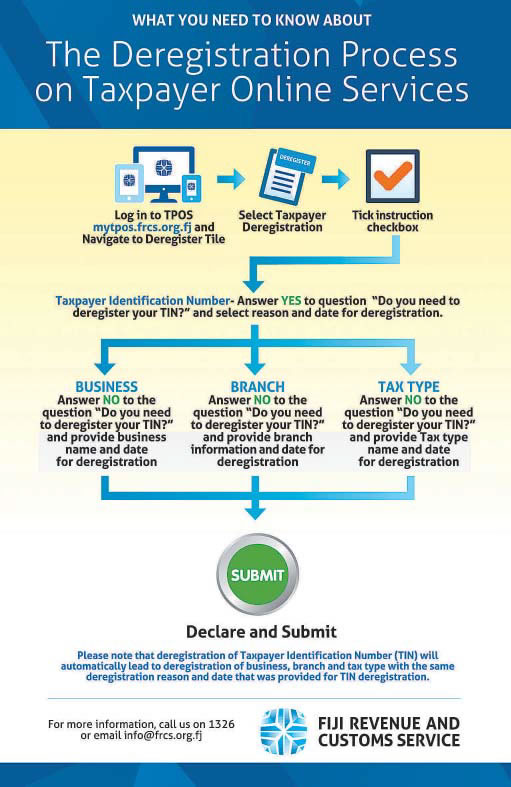
Fiji Revenue and Customs Service (FRCS) wishes to advise that effective from April 2021, application for deregistration of the taxpayer identification number (TIN), business, business branch and tax type can be made through the taxpayer online services.
The deregistration process is the latest addition to the FRCS online services.
In this week’s Tax Talk, we will focus on the digital process of applying for deregistration on the taxpayer online services.
Applications for deregistration can be made for numerous reasons including death of the taxpayer, closure of the business or change in legislation because of which taxpayer identification number (TIN) registration is no longer needed.
After successful completion of the deregistration process on the Taxpayer Online Services, registration details will be cancelled and the taxpayer details updated.
Filing deregistration on TPOS Prior to starting the deregistration process on the taxpayer online services, it is important to note that the online deregistration process is based on the four steps listed below and on each step the applicant or the taxpayer will be prompted with questions which will help in deciding whether the taxpayer intends to remain on the current deregistration process or proceed to the next type of deregistration.
The four deregistration processes are:
1. Taxpayer identification number
2. Business names
3. Branch (branch office is a location, other than the main office, where a business is conducted)
4. Tax type (any tax no longer required)
It is also important to note that the deregistration process on the TPOS varies for different taxpayers and is classified into the following categories:
1. Non-individual taxpayer other than embassy/government bodies or international organisation
2. Non-individual taxpayer either embassy/government bodies or international organisations
3. Individual taxpayer registered for business (personal income tax (PIT) –business)
4. Individual taxpayer not registered for business (personal income Tax (PIT) – salary and wage earner, filing not necessary (FNN).
Outlined below are detailed deregistration processes for different types of taxpayers.
Note that the log in process on the taxpayer online services and instructions apply to all types of taxpayers.
1. Log in The first step for deregistration is to log on and access the Taxpayer Online Services through this link https://tpos.frcs.org.fj/taxpayerportal#/Logon with the username and password.
Those who have not signed up for the taxpayer online services can click on this for information on how to sign up on the taxpayer online services – https://www.youtube.com/embed/3OLHhx-2SpE.
Once in the system, the taxpayer needs to navigate to the taxpayer dashboard and access the “Deregister” tile and click on the ‘Taxpayer Deregistration button.
2. Instructions This is a very important step on the taxpayer online services which provides instructions of the respective process.
All taxpayers need to read the instructions and confirm that they have read and understood the instructions by clicking on the checkbox provided.
The system will not allow to proceed further unless the checkbox is ticked.
Some of the important instructions for deregistration to be noted are:
· Providing accurate information and all supporting documents with the application.
· Any pending obligations open credits/debits in progress applications or ongoing cases will prevent your deregistration application from being submitted.
· Required to file a return for the period until the date of deregistration.
· It is an offence to provide false and misleading information to FRCS. To proceed further the checkbox on the declaration has to be ticked.
3. Non-individual taxpayer other than embassy/government bodies or international organisation.
This category includes companies, partnerships, trust, estates and non-profit organisations.
Taxpayer TIN deregistration
To deregister the TIN, one needs to answer yes to the question “Do you need to deregister your TIN?” posed to them and provide the reason for deregistration from the options provided along with deregistration date.
The deregistration date cannot be same or before issue date and it must be within the current system date.
It is important to note that with deregistration of TIN, business names, branch and tax type information will also deregister with the same deregistration reason and date.
Other deregistration
In case the taxpayer intends to deregister either the business name, branch or tax type but not the TIN, then they will have to answer no to the question posed on the screen “Do you need to deregister your TIN?”.
Answering no will allow the taxpayer to proceed further and select from the options business, branch and tax type information, whichever one out of the three that they would like to deregister.
Similar to deregistration of TIN, the taxpayer will also need to provide reason and date to deregister either business, branch or tax type.
4. Non –individual taxpayer either embassy/government bodies or international organisations Embassy, government body or international organisation can only deregister TIN and tax type and not business or branch information.
After logging on to the TPOS and confirming having read and understood the instructions, the taxpayer can then move on to deregistering the TIN.
The process for deregistering the TIN is similar to what’s mention above where the taxpayer needs to answer yes to the question “Do you need to deregister your TIN?” posed to them and provide the reason for deregistration from the options provided along with deregistration date.
In case the taxpayer intends to only deregister tax type then the taxpayer will need to answer no to the question “Do you need to deregister your TIN?”.
This will allow for partial deregistration of tax type.
5. Individual taxpayer registered for business (personal income tax (PIT) – business) This section is for sole trader businesses where deregistration of TIN is only applicable if an individual is deceased.
The deregistration date will be the date of the demise of the individual. The process for TIN, business, branch and tax type information is similar to what is discussed above.
The only additional question asked here will be “Will the business continue to derive income after deregistration?”
6. Individual taxpayer not registered for business (salary & wages or fi ling not necessary (FNN) taxpayers)
This group is for salary and wage earners, pensioners, students and minors. These people will only be allowed to deregister their TIN as deregistration of business, branch and tax type may not be applicable for this group of people.
The process for deregistering TIN is similar to what’s discussed above.
7. Declaration The taxpayer needs to declare that information provided in the application is true and correct. It is important to note that the return can only be submitted after the declaration is completed.
Education and awareness
FRCS has developed a number of education and awareness materials on the online processes of the various tax types to support taxpayers through the new transition.
These education materials can be accessed from the FRCS website https://www.frcs. org.fj/our-services/taxpayeronline- servicetpos/webinarsessions/ and https://www.frcs.org. fj/our-services/taxpayer-onlineservice- tpos/tpostutorial-videos/.
The user manuals are available on https://www.frcs.org.fj/ our-services/taxpayer-onlineservice- tpos/users-guide/.
FRCS encourages all taxpayers to access the online services and to use it for effi cient tax services and ease of compliance.
Please contact us on 3243000 or 1326 or email tpos@frcs.org.fj or info@frcs.org.fj for queries related to TPOS or any other tax or customs issues.